
What is the free shipping notice? #
Free shipping notifications help to increase the average order value (AOV) for online stores by incentivizing customers to add more items to their cart to meet the minimum threshold for free shipping. This leads to increased AOV as customers seek to avoid paying shipping fees by adding more items to their cart.
How to set up the free shipping notice #
Once set up, the free shipping notice will show within the cart drawer and on the cart page.
Steps
- Open the Theme editor go to Theme settings > CART
- Scroll to the Free shipping notice setting and enable the Show free shipping notice setting.
- In the Minimum order amount input field enter the minimum order amount(s) to qualify for free shipping and make sure to have each currency entry on a separate line (see below).
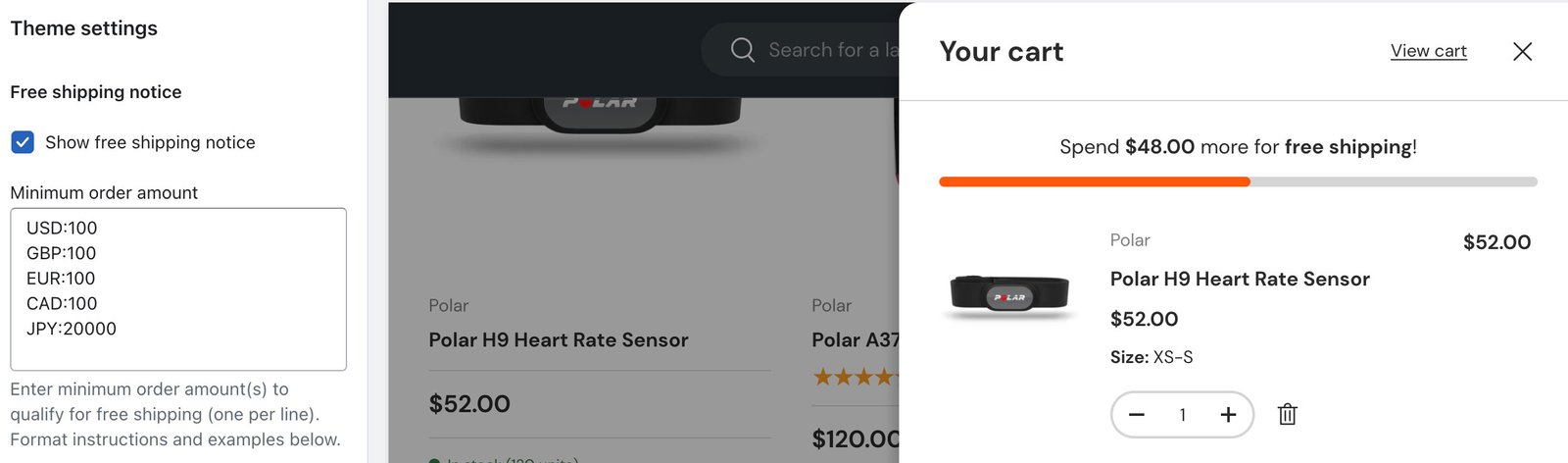
Make certain to follow the exact format of placing the country specific code before the minimum order amount. Example: USD:100 for minimum order amount of $100 USD.
If you wish to include regional variations of a currency, such as Ecuadorian Dollar, make sure to place the standard non-regionalised currency codes first in the list. You can then add to the list with regional currency codes. Example: EC:USD:120 for minimum order amount of $120 USD for Ecuador.
Refer to these lists of currency codes and country codes to find the correct code to use.


