logo_5.31_2
  • Home
  • Shopify Themes
  • Shopify Guides
  • Docs
  • FAQs
  • Contact Us
✕
  • Home
  • Shopify Themes
  • Shopify Guides
  • Docs
  • FAQs
  • Contact Us

Getting started

2
  • About VotraLee
  • Sales-boosting features

Header

5
  • Header section
  • Mega menus
  • Search bar
  • Announcement bar
  • Languages & currencies

Sections

21
  • Age verification pop-up
  • Background video
  • Collapsible content
  • Collection list
  • Contact form
  • Countdown timer
  • Featured collection
  • Featured product
  • Footer
  • Icons with text
  • Link lists
  • Media grid & promo grid
  • Navigation slideshow
  • Pop-up
  • Product comparison grid
  • Product features
  • Promo strip
  • Scrolling banner
  • Shoppable image
  • Slideshow
  • Video

Products & collections

8
  • Product page
  • Collection page
  • Product inventory indicators
  • Product compare
  • Flash messages
  • Size chart
  • How to set up multiple variant images
  • Related collections

Cart

3
  • Cart
  • Cart drawer
  • Free shipping notice

Pages & templates

5
  • Contact page
  • FAQ page
  • Checkout page
  • Blog posts
  • Blog page

Theme settings

6
  • Product labels
  • Color blending
  • Breadcrumbs
  • Typography
  • Swatches
  • Favicon

General guides

2
  • Video FAQ
  • Image FAQ

Technical guides

2
  • Search engine optimization (SEO)
  • Performance guide
View Categories
  • Home
  • Docs
  • Theme settings
  • Typography

Typography

What are the typography settings? #

The typography settings allow you to change the font families, sizes and styles for all text within the store.

You can specify different fonts for Headings, Body and Navigation, with various options to allow for differences in headings, subheadings and buttons.


How can I change the typography settings? #


Steps

  1. Open the Theme Editor.
  2. Click on Theme settings > TYPOGRAPHY.
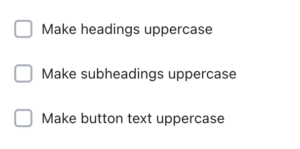
  3. Settings are available to make all headings/subheadings/buttons uppercase throughout the store.
  4. The Heading text scale dropdown can be used to change the size of the headings. The size of the heading will scale automatically on mobile (i.e. it will be slightly smaller on mobile).
 

Speed considerations #

Keep the number of different fonts used to a minimum, as this may help increase speed scores.

In addition, using the SYSTEM FONTS is preferable as they load faster than OTHER FONTS. Refer to our Performance guide for more.

What are your Feelings

  • Happy
  • Normal
  • Sad

Share This Article :

  • Facebook
  • X
  • LinkedIn
  • Pinterest
BreadcrumbsSwatches
Table of Contents
  • What are the typography settings?
  • How can I change the typography settings?
  • Speed considerations
 
9.10

Shopify themes

Support

  • Docs
  • FAQs
  • Contact Us

Support hours

Monday to Friday (except Chinese public holidays)
09:30 to 17:00 CST
 

Copyright © 2023 VotraLee – All Rights Reserved.

  • Privacy Policy
  • Terms of Service